Elevate Your Visuals with Aesthetic Texture Backgrounds
In a digital landscape saturated with flat colors and generic gradients, capturing attention requires a certain depth and authenticity. We often spend hours tweaking layouts and kerning text, yet the foundation of our designs—the background—frequently gets overlooked. This is where the strategic use of texture changes everything. It is not just about decoration; it is about creating an atmosphere that stops a viewer mid-scroll and invites them to look closer.
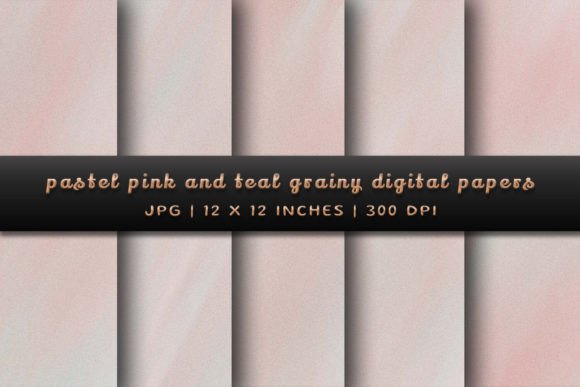
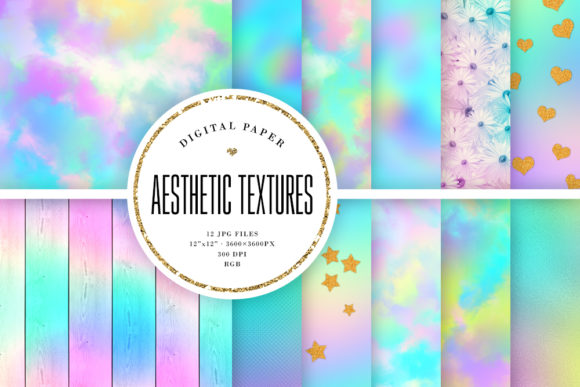
You have likely heard of Aesthetic Texture Backgrounds, but understanding what makes this collection valuable requires looking beyond the file names. With 12 JPG files included, each boasting 3600×3600 pixel dimensions and a 300 DPI resolution, this is a toolkit built for serious production work. Whether you are designing for the screen or preparing high-end print collateral, these assets provide the quality necessary to maintain professionalism across all mediums.
The Anatomy of a Perfect Texture
So, what exactly defines the "aesthetic" in these backgrounds? It is a balance between grit and grace. When we talk about texture in modern design assets, we are looking for elements that add character without overwhelming the content. These textures are designed to sit comfortably behind typography or imagery, providing a tactile feel that mimics physical materials—perhaps a subtle paper grain, a soft watercolor wash, or a distressed concrete finish.
The personality of Aesthetic Texture Backgrounds lies in their versatility. They are not chaotic; they are controlled. This makes them incredibly useful for brand identity projects. For a small business owner or entrepreneur, consistency is key. You want a visual language that feels established and trustworthy. By incorporating these backgrounds into your logo design presentations or your website hero sections, you instantly elevate the perceived value of your offering. It signals to your audience that you care about the details.
Practical Applications for Creators and Marketers
How do you actually use these files in your day-to-day workflow? The applications are vast, ranging from digital to print projects. For social media graphics, where the competition for attention is fierce, a textured background can make your text pop in a way that solid colors simply cannot. Imagine an Instagram quote post or a Pinterest pin; adding a layer of Aesthetic Texture Backgrounds under your font pairing creates a cohesive, artistic look that encourages engagement.
For those in editorial design or packaging design, the high print dimensions (12" x 12") and RGB color mode ensure that your designs retain their vibrancy and clarity. Here is where you can experiment with blending modes in your editing software:
- Multiply: This mode allows the texture to blend with your background color, creating a vintage or worn effect that works well for creative font displays.
- Overlay: Use this to add depth to your photos. It is excellent for web design headers where you want to maintain the image but add a tactile feel.
- Soft Light: Perfect for adding a subtle atmospheric haze to your marketing materials without distracting from the readability of your body text.
Even crafters and hobbyists will find immense value here. If you are creating digital planners, scrapbooking elements, or printable wall art, the 300 DPI resolution ensures that your final product looks crisp and professional when printed at home or through a print shop.
Integrating Texture with Typography
One of the most common mistakes in design is fighting between the background and the foreground. When you use Aesthetic Texture Backgrounds, you must consider your typeface choices carefully. Texture adds visual noise, so your typography needs to have enough weight or contrast to remain legible.
If you are using a display font or a script font for a headline, ensure the texture is subtle in the areas where the text sits. You might even consider using a semi-transparent shape or a "knockout" effect to separate the text from the background. Conversely, if you are using a clean sans serif font for body copy, you can get away with a slightly more aggressive texture, as the simplicity of the letters creates a natural contrast.
Think of the background as the stage and the typography as the actor. The stage sets the mood—moody, elegant, rustic, or industrial—but it shouldn't distract from the performance. For bloggers and publishers, this means ensuring that your articles remain easy to read. A textured background is excellent for sidebars, footers, or featured image sections, but keep your main reading area clean to maintain readability and user experience.
Strategic Selection and Workflow Tips
Before you download and start layering, take a moment to evaluate the project fit. Ask yourself what emotion you are trying to evoke. Is it luxury? Organic warmth? Urban grit? The specific style of the texture should align with your brand perception.
Here is a practical checklist for working with these assets:
- Color Adjustments: Even though the files are delivered in RGB, you can easily shift the hue to match your specific brand palette using Hue/Saturation adjustment layers.
- Scale and Crop: With 3600×3600 pixels, you have plenty of room to crop. Don't be afraid to zoom in on a specific area of the texture to create a different look, effectively giving you 24 or 36 variations from this single pack.
- Opacity Control: Rarely should a texture sit at 100% opacity. Play with the transparency to dial in the perfect amount of grit for your visual hierarchy.
For marketers, remember that consistency builds recognition. If you choose a specific texture for your Q1 campaign landing page, consider using variations of that same texture in your email headers and social posts. This creates a unified commercial experience that strengthens your brand identity.
Ultimately, Aesthetic Texture Backgrounds are more than just pretty pictures; they are functional design assets that solve the problem of flat, uninspired visuals. By mastering how to blend, mask, and pair these textures with your modern typography, you create a richer, more immersive experience for your audience. Whether you are a seasoned graphic designer or a content creator just finding your style, these backgrounds provide the foundation for work that feels truly finished and professional.